





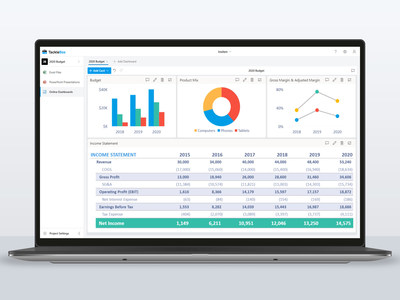
If you’ve ever tried manually piecing together PowerPoint presentations from multiple, constantly changing Excel files, you will welcome TackleBox. The newly launched cloud-based tool automates the entire process and supports wide applications, such as financial reporting, business consulting, and executive presentations.
TackleBox automatically scans existing Excel files to detect charts, ranges, and tables. This content is then injected into PowerPoint presentations and easily refreshed with a single click, ensuring analysis and presentations are always in sync.
“It’s like putting your PowerPoint presentations on autopilot,” says CEO Adam Trien. “Our team developed the app in response to client complaints about the tedious, time-consuming effort of constantly copying and pasting between Excel and PowerPoint. Not only does TackleBox save time, it provides full control, with alerts when new Excel analysis becomes available, and by allowing you to preview and confirm changes.”
TackleBox also provides file organization, comment threads, and notification alerts to enable collaboration for remote teams. “These benefits are especially valuable as companies pivot to a work from home model in response to Covid-19,” says Trien.
During its final months of development, TackleBox was Beta tested to a wide audience, from financial analysts to CEOs, with tremendous response. Reported one client: “This is an amazing tool. It gives us confidence that our presentations are always in sync with Excel and has saved our team hours and hours of frustration.”
TackleBox Highlights
Excel to PowerPoint Automation: Quickly inject Excel charts, tables, and named ranges into PowerPoint slides. As your Excel files change, the TackleBox automation engine refreshes presentations, ensuring they are reliably up to date.
Live Dashboards: Create online, real-time dashboards displaying the latest content from multiple Excel files all at once. Gain insights into how your data is changing and share dashboards with stakeholders to give them a live view of your progress.
Microsoft Office 365 Integration: Nothing to download or install. No complicated user guides. TackleBox works directly with existing Microsoft Office 365 files and folders. Just sign in and go.
For a free demo or more information: sales@tacklebox.app or www.tacklebox.app.
TackleBox was developed by Insiten Inc., an Atlanta-based technology company focused on developing innovative solutions for corporate finance and business professionals. Our unique blend of business acumen and technical proficiency connects people, processes, and data. Learn more at www.insiten.com.
Contact: Adam Trien, sales@tacklebox.app